Top MCP Servers for Frontend Developers
- Canva MCP Server
- DigitalOcean MCP Server
- Figma’s Dev Mode MCP Server
- GitHub MCP Server
- JetBrains MCP Proxy Server
- React MCP Server (third-party)
- Shopify Dev MCP server
- Vercel MCP Server
- Angular CLI MCP Server
Canva MCP Server
The Canva Dev Model Context Protocol (MCP) server provides AI-powered development assistance for Canva apps and integrations. By connecting your preferred MCP client (such as Cursor, Claude Desktop, or other compatible tools) to canva.dev, you can access specialized tools and documentation to enhance your development workflow.
DigitalOcean MCP Server
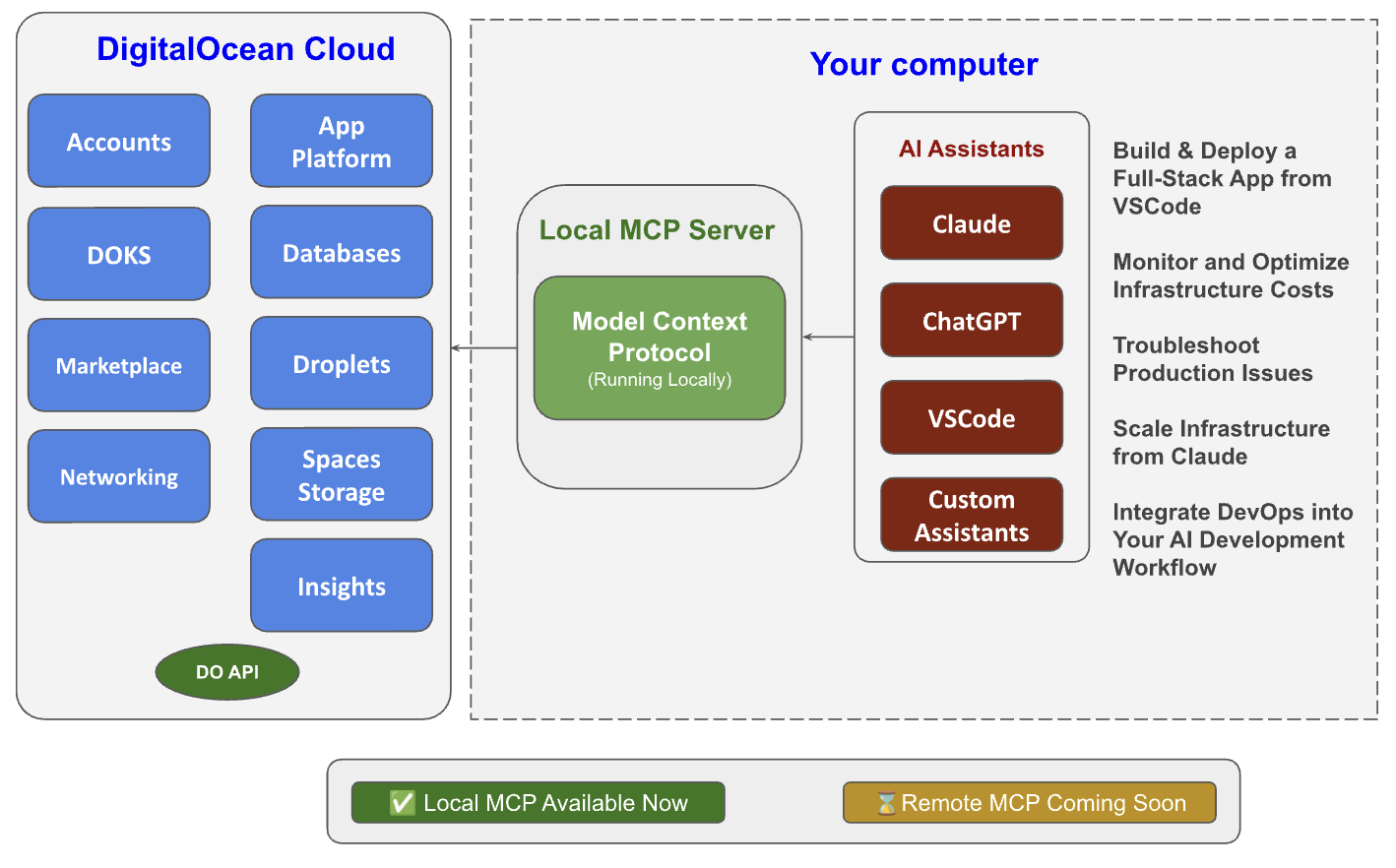
The new DigitalOcean MCP (Model Context Protocol) Server enables you to manage your cloud resources with simple, natural language commands through AI-powered tools like Cursor, Claude, or your own custom Large Language Models (LLM). Running locally, it connects seamlessly to 9 services – making cloud operations faster, easier, and more intuitive for developers.
Figma’s Dev Mode MCP Server
The Figma MCP server developers implement designs quickly and accurately by providing important context to AI agents that generate code from Figma design, FigJam and Make files. The tools within Figma’s MCP server bring additional context from Figma into your workflow, so your code doesn't just match your existing systems, but your design, too
- Generate code from selected frames
- Extract design context
- Retrieve FigJam resources
- Retrieve Make resources
- Keep your design system components consistent with Code Connect
GitHub MCP Server
The GitHub MCP Server connects AI tools directly to GitHub's . This gives AI agents, assistants, and chatbots the ability to read repositories and code files, manage issues and PRs, analyze code, and automate workflows. All through natural language interactions.
Use Cases
- Repository Management: Browse and query code, search files, analyze commits, and understand project structure across any repository you have access to.
- Issue & PR Automation: Create, update, and manage issues and pull requests. Let AI help triage bugs, review code changes, and maintain project boards.
- CI/CD & Workflow Intelligence: Monitor GitHub Actions workflow runs, analyze build failures, manage releases, and get insights into your development pipeline.
- Code Analysis: Examine security findings, review Dependabot alerts, understand code patterns, and get comprehensive insights into your codebase.
- Team Collaboration: Access discussions, manage notifications, analyze team activity, and streamline processes for your team.
JetBrains MCP Proxy Server
The JetBrains MCP Proxy Server is a tool that acts as a bridge, or proxy, between an external AI client (such as Claude Desktop or Cursor) and a JetBrains IDE. This allows AI assistants to interact with and control the IDE, providing context from your project files and leveraging IDE features without you leaving the AI application
Key Features and Usage
- Model Context Protocol (MCP): The proxy is built on the open Model Context Protocol (MCP), an open standard for connecting AI clients with various data sources and tools.
- Integrated Server: Starting with recent versions (e.g., 2025.2), many JetBrains IDEs have an integrated MCP server, which can be enabled in the settings (under Settings | Tools | MCP Server or Settings | Tools | AI Assistant | Model Context Protocol (MCP)).
- External Proxy: For external configuration or specific environments (like connecting via Docker or different operating systems), JetBrains provides an official proxy package (e.g., @jetbrains/mcp-proxy on NPM) that facilitates the connection.
- Functionality: The server allows the AI client to perform actions within the IDE, such as accessing project structure, reading code, and potentially running commands or configurations.
React MCP Server
"React MCP Server" refers to an implementation of the open-source Model Context Protocol (MCP) designed to run locally or remotely and provide real-time, context-aware information to AI clients (like Claude or GitHub Copilot) within a React development environment. MCP acts as a "universal standard" for AI tools to interact with external data sources, APIs, or local project files in a secure, standardized way.
Key Benefits
- Contextual Awareness: Allows the AI to access real-time, project-specific data beyond its initial training, leading to more accurate and relevant code suggestions.
- Security & Privacy: Many React MCP servers run locally, ensuring proprietary code is not sent to a third-party cloud service.
- Standardization: Provides a single, universal standard for AI-tool integrations, replacing fragmented and custom APIs.
Support plase: https://buy.stripe.com/aFadRabYXctc3rg7uddIA00
ความคิดเห็น
แสดงความคิดเห็น